1. Log into the CISCO Credit website at: credit.ciscocredit.com
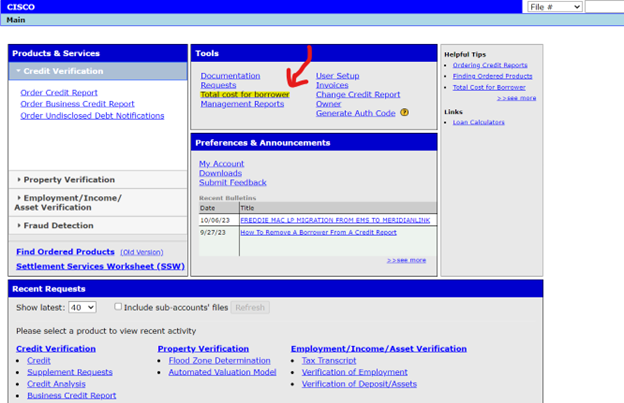
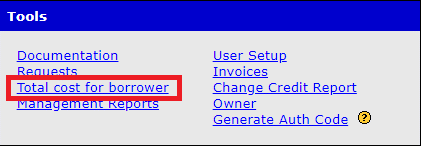
2. Once logged in, select the Total Cost for Borrower product located under the Tools section.
3. While on the Total Cost for Borrower screen, fill in all info that you have regarding the loan, or simply put in your borrower's first and last name, reference number, or Social Security Number and select Seach.
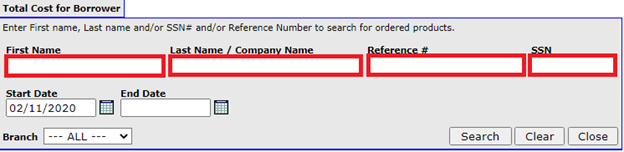
*Note: The Reference Number field here refers specifically to the reference number on the credit report, not the credit report’s file number
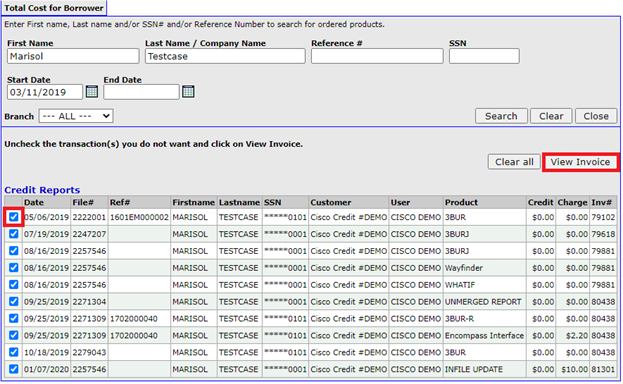
4. Once results appear, use the check boxes on the left side to indicate which products you would like included in the Total Cost of Borrower Invoice, then select the VIEW INVOICE option to generate your new complete Invoice.
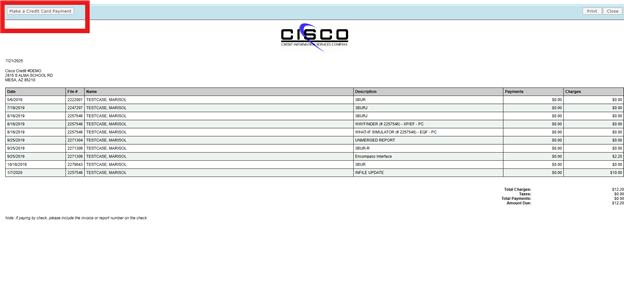
5. Charges can be paid by selecting Make a Credit Card Payment option in the upper-left of the new window.
Follow this link for more CISCO Credit Knowledgebase articles.
Was this article helpful?
That’s Great!
Thank you for your feedback
Sorry! We couldn't be helpful
Thank you for your feedback
Feedback sent
We appreciate your effort and will try to fix the article