1. Log In: Access our CISCO Credit Portal with your hard inquiry login credentials.
2. Navigate to the Employment/Income/Asset Verification Tab: On the Main Desktop, click the tab under "Products & Services" labeled "Employment/Income/Asset Verification."
3. Select link
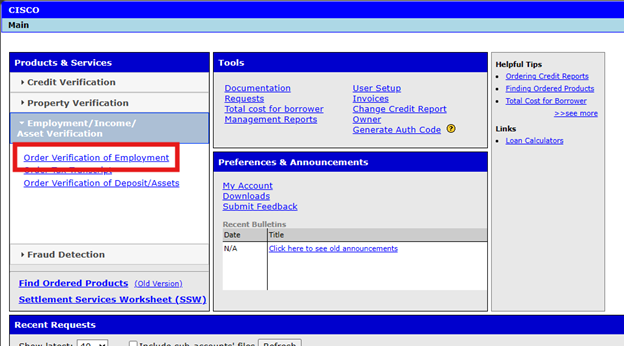
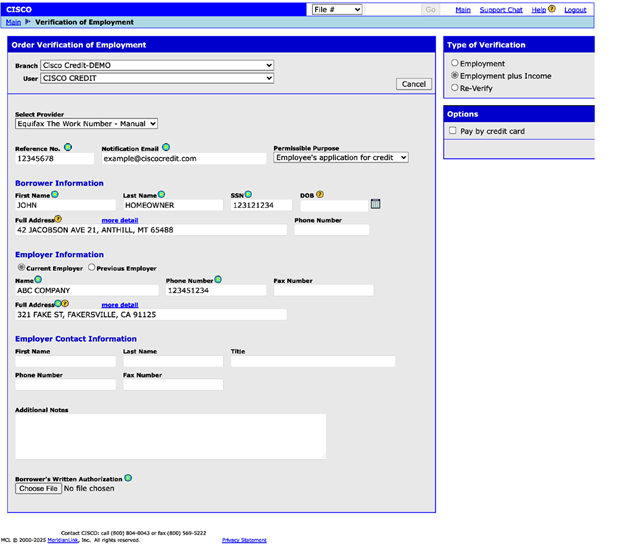
• Select the link that says, "Order Verification of Employment."
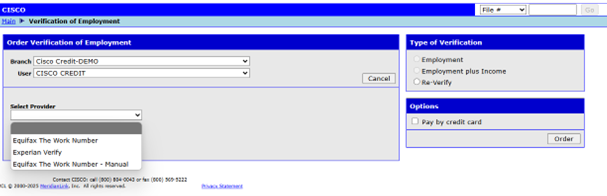
• In the next window, use the drop-down menu labeled "Provider" to choose between:
- Equifax The Work Number
- Experian Verify
- Equifax The Work Number – Manual
4. VOE + Income Pricing:
- The Work Number: Searches a 36-month timeframe. Charges per verification, not per order.
- Same job in the last 3 years: $73.00
- Two or more jobs in the last three (3) years: $146.00 (Maximum cost)
- Manual Verifications through The Work Number: $73.00 per verification.
- Experian Verify: Searches a 24-month timeframe. Charges a flat $65.00 per order.
5. Required Fields:
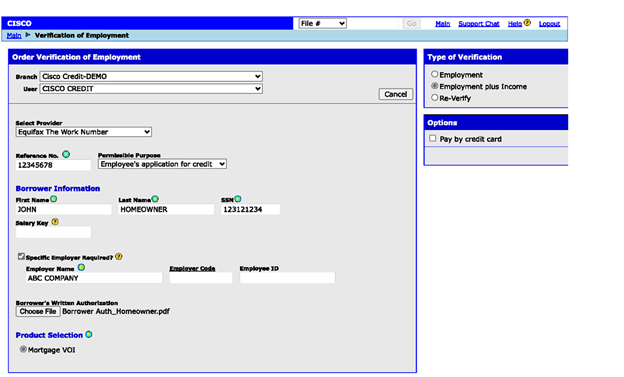
- After choosing the provider, fill in the required fields and any optional fields you wish. Required fields have above them.
6. Select VOE Plus Income Verification:
- Choose the option for "Verification of Employment (VOE) plus income" in the upper right corner labeled "Type of Verification."
7. Enter Borrower Information:
- Input the borrower's details including name, social security number, and address. Date of birth is optional.
8. Attach Borrower Authorization:
- Attach the necessary authorization form signed by the borrower.
9. Choose Product Selection:
- At the bottom-left, select the Product Selection record filter labeled "Mortgage VOI."
10. Submit the Request:
- After entering all information and attaching the authorization form, click "Order" to submit.
- To pay at the time of ordering, click "Pay by Credit Card," then select "Order" and enter the card information in the next window.
11. Review the Response:
- Wait for the verification response, which may take a minute if ordering an instant VOE through The Work Number or Experian Verify.
- If ordering a manual Verification of Employment through TWN, the turnaround time is approximately one to two business days. This may take longer if The Work Number is not able to reach the employer.
12. Access the Report:
- Once the verification is complete, access the report in the CISCO web portal by select View Report
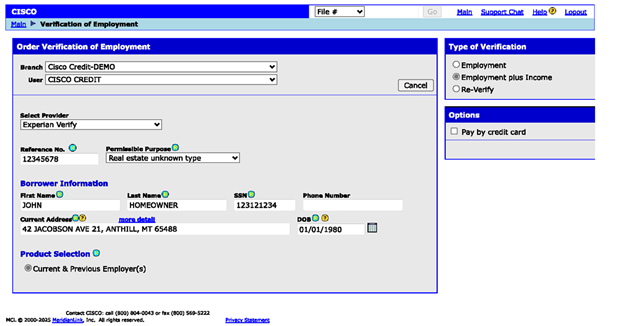
Note: If ordering a Verification of Employment plus Income through Experian Verify, DO NOT CHANGE THE PERMISSIBLE PURPOSE. The default, “Real Estate or Unknown Type” is the only one accepted by Experian.
Follow this link for more CISCO Credit Knowledgebase articles.
Was this article helpful?
That’s Great!
Thank you for your feedback
Sorry! We couldn't be helpful
Thank you for your feedback
Feedback sent
We appreciate your effort and will try to fix the article