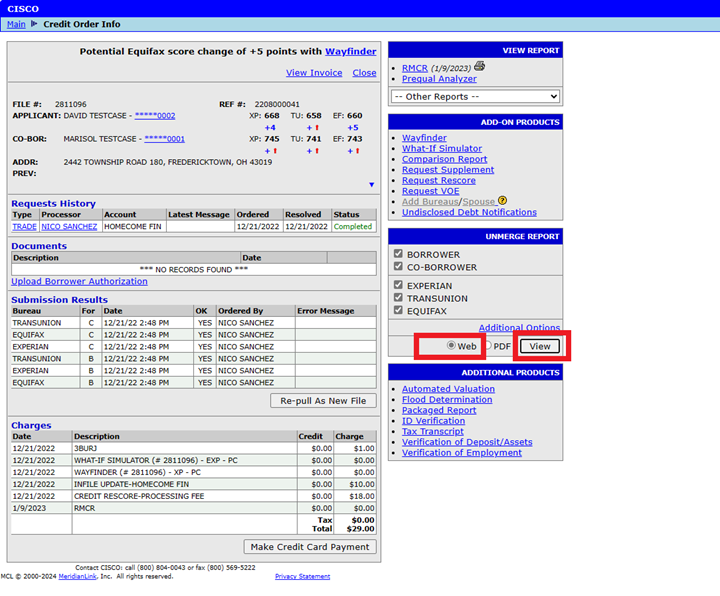
To swap borrower positions on joint files through our web portal, first select Web at the bottom of the Unmerge Report section on the file. Next, select the View button to bring up a new window showing the credit report.
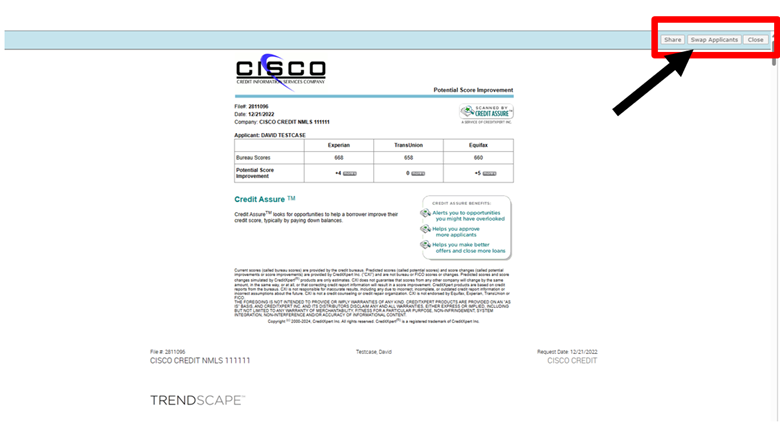
In the next window, select "Swap Applicants" in the upper-right hand corner of the screen.
A warning dialog box will appear saying, “You have asked to generate a new document with the applicants swapped. Please note that additional charges for the report may apply.” Click OK.
After the system finishes processing, you will now see that the borrower and coborrower positions have swapped and you’ll have a new file number for them.
Follow this link for more CISCO Credit Knowledgebase articles.
Was this article helpful?
That’s Great!
Thank you for your feedback
Sorry! We couldn't be helpful
Thank you for your feedback
Feedback sent
We appreciate your effort and will try to fix the article