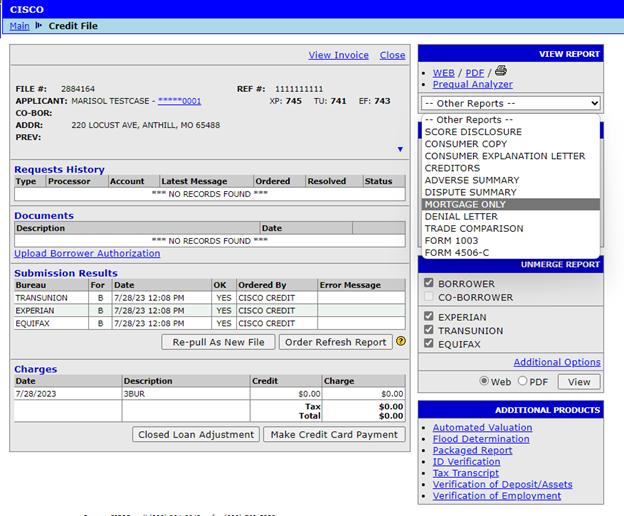
1. For a mortgage only report, you will need to pull credit on the borrower first. Next, login to our website and enter the file number to pull up the consumer’s file. On the right side of the page, click on the Other Reports drop down menu and select Mortgage Only.
2. In the new window, select the TYPE at the top left of the page, and click on any old or unwanted mortgages in the tradelines to hide them.
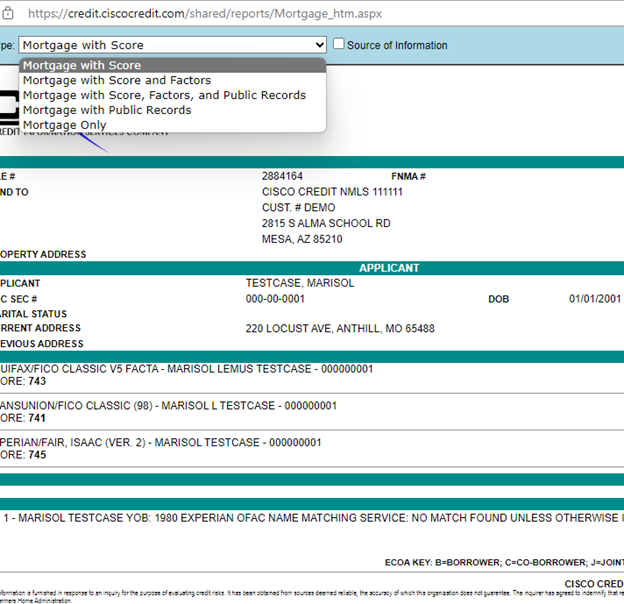
To download the Mortgage Only, select Share at the top-right, then select Download PDF.
Follow this link for more CISCO Credit Knowledgebase articles.
Was this article helpful?
That’s Great!
Thank you for your feedback
Sorry! We couldn't be helpful
Thank you for your feedback
Feedback sent
We appreciate your effort and will try to fix the article