*IMPORTANT NOTES*
If the file is over 30 days old, this method will not work. A user cannot merge data that is over 30 days apart, so a new joint credit report would be needed.
If the file for the borrower has been reissued to automated underwriting, you must contact CISCO Credit to request a copy file. Once provided the new file number, you may follow the steps below.
Step 1: Log in to CISCO Credit
Go to credit.ciscocredit.com and sign in using your account credentials.
Step 2: Open the Borrower’s File
Enter the borrower’s file number in the search field to access the existing credit file.
Step 3: Select “Add Bureaus / Spouse”
Within the file, on the right-hand side of the screen, locate the blue underscored link labeled ADD BUREAUS / SPOUSE. Click SPOUSE to begin adding the additional applicant.
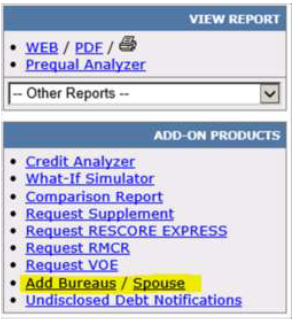
Step 4: Enter Spouse Information
A new window will appear prompting you to enter the spouse’s personal information.
- If paying by credit card, check the Pay by Credit Card box.
- After entering all required information, click ORDER.
Note: Ordering the spouse’s report does not generate a new report for the primary borrower. Only the new applicant’s credit report will be pulled.
Follow this link for more CISCO Credit Knowledgebase articles.
Was this article helpful?
That’s Great!
Thank you for your feedback
Sorry! We couldn't be helpful
Thank you for your feedback
Feedback sent
We appreciate your effort and will try to fix the article